


 Instead of Jobber
The best Jobber alternatives for event businesses
Winkquote is the best Jobber alternative when your work is events rather than house calls. It prices by guests, hours, staff and travel, holds the date with a signed contract and deposit, and tracks the equipment every event needs.
Free to run your business. No card needed.
Updated November 21, 2026. Every price is from each tool's own pricing page; sources are listed with each one.
The picks at a glance
- 1. WinkquoteBest overallEvent and mobile businesses whose quotes depend on guests, hours, staffing, travel and equipment.
- 2. QuotientTeams that mainly send interactive quotes and proposals.
- 3. HoneyBookCreative and service businesses that want proposals, contracts, invoices and a client portal in one general CRM.
- 4. DubsadoService businesses that want to design their own forms and client workflows from a blank canvas.
- 5. Check CherryEvent businesses and venues that want online booking where clients pick packages, backdrops and templates.
Why people look for a Jobber alternative
Built for jobs and visits
Jobber is made for home and field service. Guest counts, event-length staffing and equipment availability aren't part of its quotes.
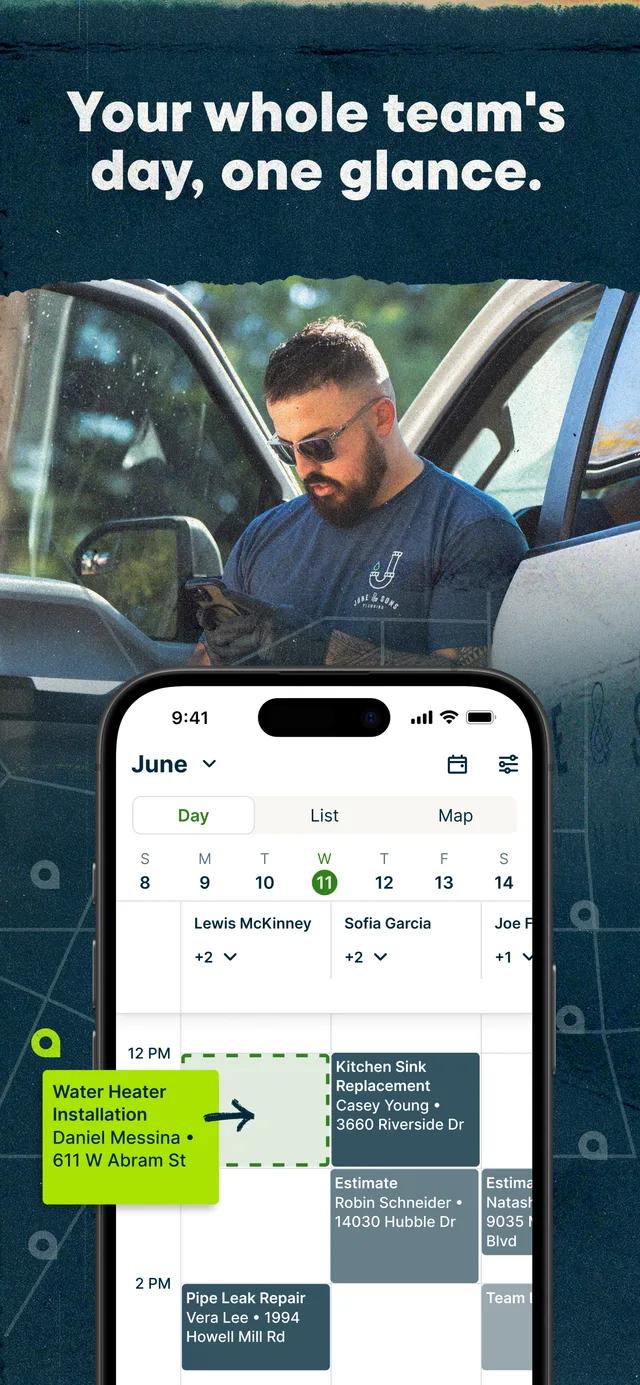
Jobber's calendar is made for home service visits.Source: App Store listing, captured Nov 22, 2026 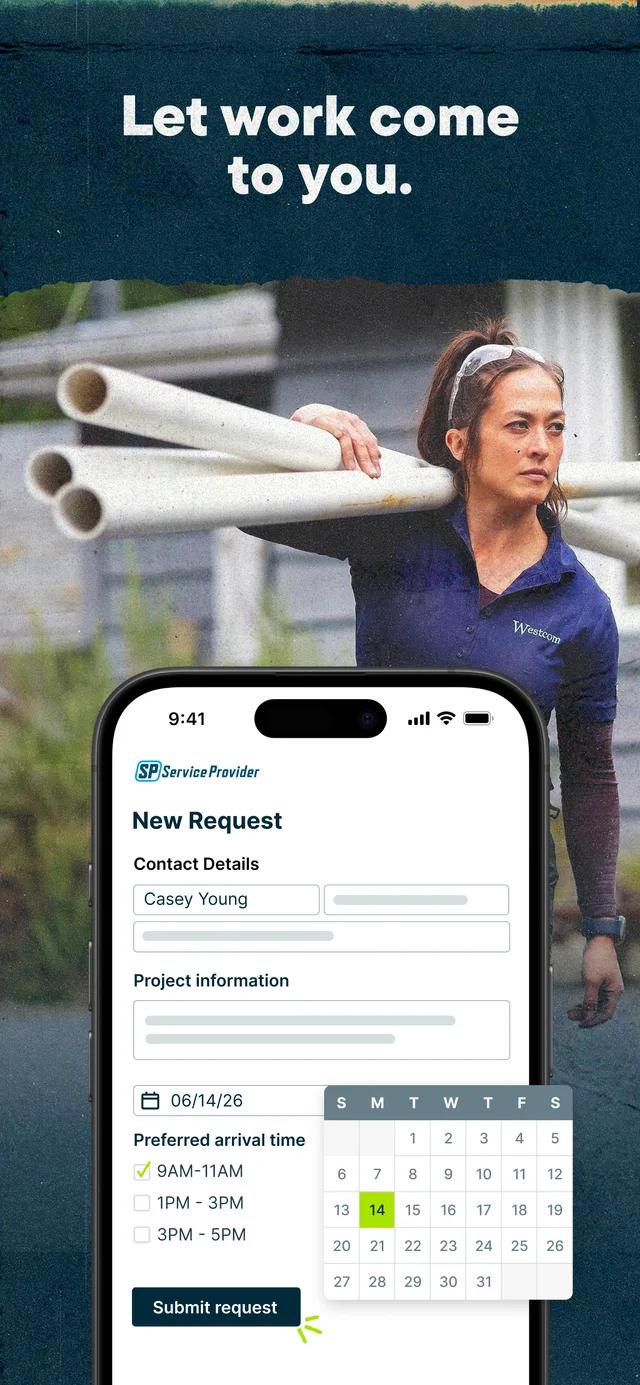
A Jobber request books an arrival window at the client's property.Source: App Store listing, captured Nov 22, 2026 Users cost more
Jobber's plans include a set number of users, and each extra user is $29 a month.
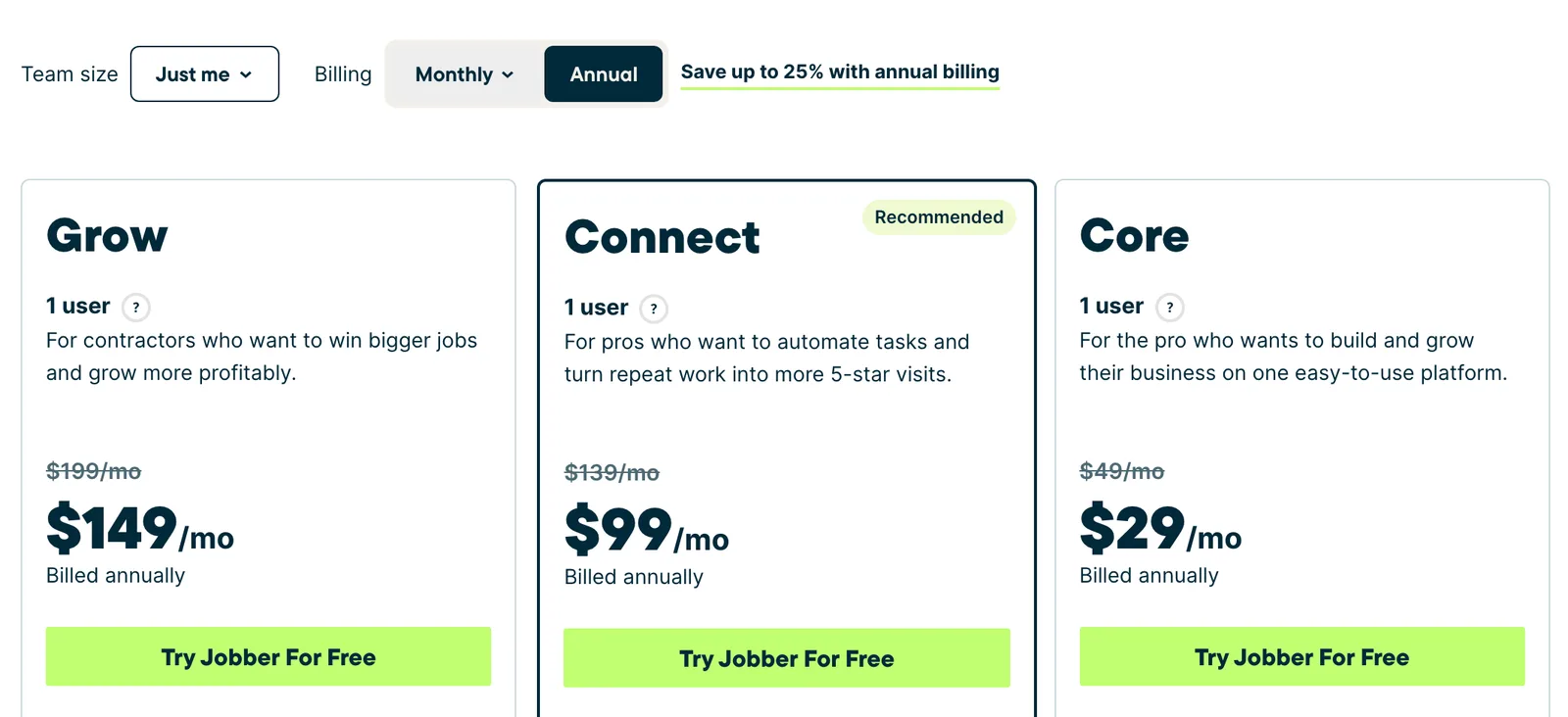
Every Jobber plan starts at one user.Source: getjobber.com/pricing-plans, captured Nov 22, 2026 Follow-ups on higher plans
Automated quote and invoice follow-ups start on Connect, from $99/mo billed annually.
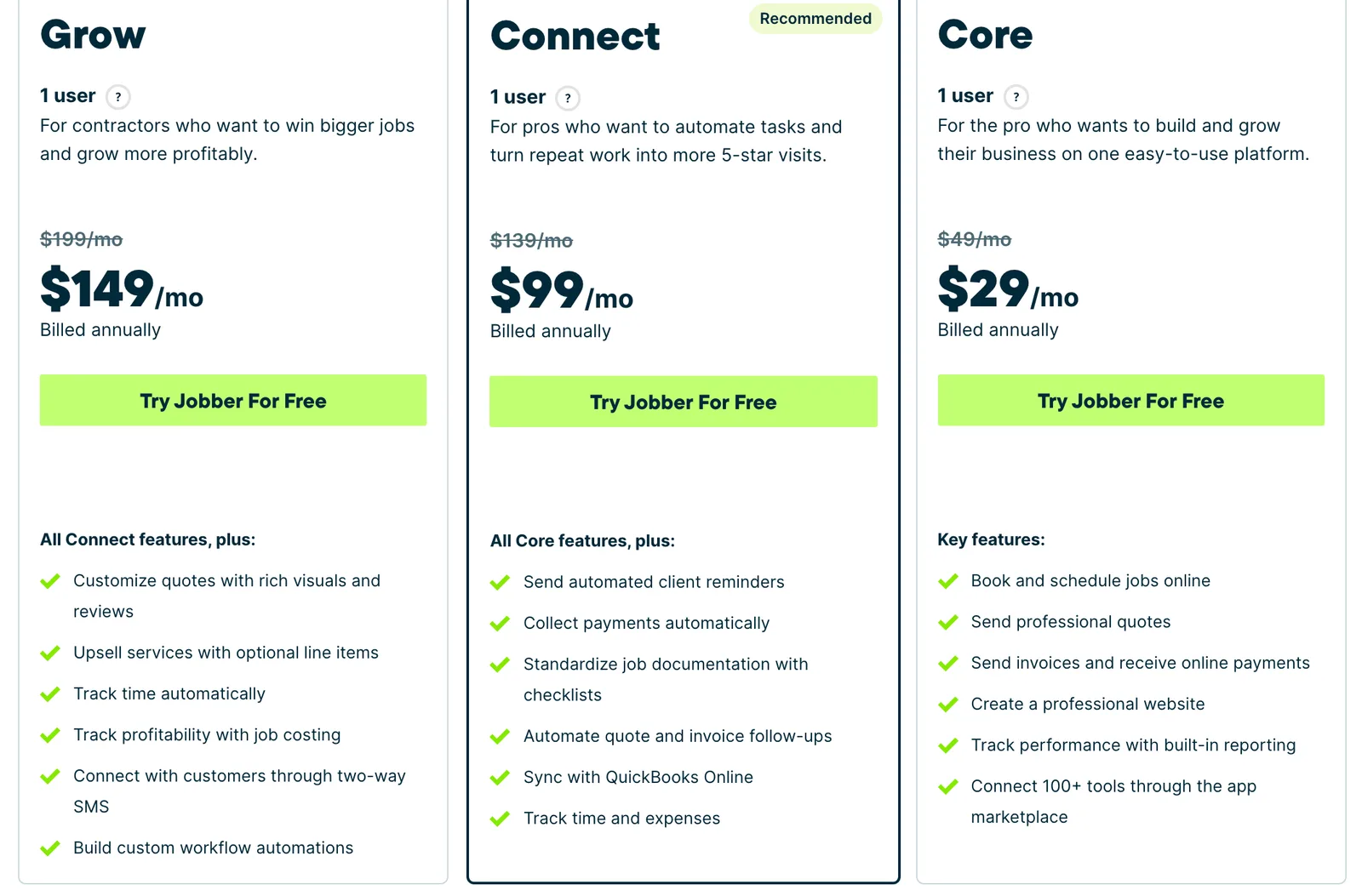
Automated quote and invoice follow-ups start on Jobber Connect.Source: getjobber.com/pricing-plans, captured Nov 22, 2026
From Jobber's own website, checked November 21, 2026.
1. Winkquote: the best Jobber alternative
Field-service tools, rebuilt around the event.
Online booking, quotes, invoices, payments, checklists and a crew schedule are all here, shaped for events: the quote knows the guest count, the shift includes setup and breakdown, and the unit is held for the day.
- Per-guest, per-hour and per-person pricing with minimums
- Contracts signed and deposits paid when they book
- Equipment, trailers and vehicles tracked across events
- Up to 20 people who sign in, no charge per person
Winkquote and Jobber, side by side
| What | w;nkquote | Jobber |
|---|---|---|
| Built for | Businesses that travel to the event | Home and field service businesses |
| Plans | Free, Plus $49/mo, Scale $149/mo | Core from $29/mo billed annually, up to $699/mo |
| Users | Up to 20, no charge per person | Included by plan, then $29/mo each |
| Quotes | Priced live from guests, hours, staffing and travel | Line items you price |
| Contracts and deposits | Signed and paid as they book, every plan | Quotes and invoices with online payments |
| Automated follow-ups | Every plan | Connect and up |
| Equipment availability | Every plan | Not listed on its pricing page |
What Winkquote does
One tool from the first question to the last payment.
Everything below runs the business, so it's on every plan, Free included.
Pricing
It prices the way you already think.
Per guest, per hour, per person, by guest tiers, by servings or flat. Every service sets its own rules, and the quote form adds them up live while your customer answers.
- Minimums, weekend and holiday rates, peak dates and short-notice pricing
- Staffing worked out from guests and hours, and priced into the quote
- Travel from the real road distance: free miles, then your per-mile rate or zones
- Service charges, gratuity and tax applied the same way every time
- Add-ons that need your OK wait for you before the quote goes out
How Reed Street Coffee prices
- Espresso Bar$300 base + $6.00 a guest · $500 minimum
- Barista time$45 a staff hour, 1 barista per 100 guests
- Rush booking+20% under 7 days, +35% inside 48 hours
- Travel20 miles free, then $1.25 a mile, there and back
- Sales taxOn the lines you choose
Quote forms and booking site
A quote in seconds, or a priced draft for your review.
Customers see the price build as they answer. Send the quote the moment they finish, or have high-ticket requests wait for a quick look, already priced. Every quote form, service and add-on is unlimited on every plan.
- Five form layouts, with questions that only show when they matter
- Requests saved once you have an email or phone, so nothing is lost
- A booking site from 19 templates, at your own domain, with the form built in
- A Book now button or one-line embed for the website you already have
Contracts and payments
Booked means signed and paid.
Customers accept, sign your contract and pay the deposit in a few taps. Balances charge on the date you set, straight into your own Stripe account.
- Payment schedules with retries and reminders, or let customers pick one of yours
- Recurring agreements for retainers and repeat events
- Card, Apple Pay, Google Pay and bank payments; cash and checks recorded too
- A customer portal on every plan: quotes, bookings, payments, contracts, messages and files
Event day
Dates fill up honestly. The crew knows the plan.
Carts, booths, bars, gear and vehicles are tracked like inventory, so your forms only offer dates you can actually serve. One unit can work a morning and an evening event, with the drive and your turnaround time between them.
- Load plans for trailers and vehicles, and a waitlist when every unit is out
- A brief on each crew member's phone, even with no signal at the venue
- Checklists and packing lists that scale with the guest count
- A Crew needed alert when a booking needs more people than are free
Follow-up
Follow-ups that stop the moment they book.
Flows send your emails on their own, from the first reply to the review request, and stop when the customer books or says no. Start from a workflow template, build your own, or describe it and let Winq draft it.
- Every customer conversation in one inbox, with quick replies and mentions
- Consultation calls customers book from your hours, free on every plan
- One review program that sends each customer to the right place
Team and growth
Room for the whole team, and the next brand.
Up to 20 people who sign in on every plan, with no charge per person and roles you shape. Crew who don't sign in aren't counted.
- Reports on revenue, staff hours, sales tax, equipment use and margin per event
- Pass on or share events with other vendors, always with your customer's OK
- Up to 10 brands under one business on Scale, with one team, calendar and Stripe account
- An AI connector on every plan, Zapier on Plus and the API on Scale
Built for your business
Set up for the way your kind of business sells.
Pick your business type and Winkquote starts you with services, forms and pricing made for it. Run more than one kind of service and it handles each its own way.
- Coffee carts and mobile barsPer-guest packages, baristas or bartenders from guests and hours, packing lists per guest, and carts and trailers that can't be double-booked.See how
- Food trucks and cateringPer-guest menus with minimums, servings and guest tiers, service charges and tax, short-notice pricing, and event details collected after they book.See how
- PhotographersSession inquiry forms, appointment times, private galleries with proofing, print sales through your own lab, and retainers.See how
- Photo boothsHourly packages with a minimum, add-ons priced live, every booth, backdrop and van tracked, and real setup and breakdown times on the calendar.See how
- DJs and entertainmentHourly sets with add-ons, contracts signed online, speakers, lights and vans tracked, and reports by event type.See how
- Event rentalsCustomers choose quantities within what's free, delivery priced from the route, and each rental held from drop-off to pickup.See how
- Beauty and wellnessPer-person pricing for every party, artists sized to the group, travel in the quote, appointment times and a deposit that holds the date.See how
Other Jobber alternatives
2. Quotient
- Best for
- Teams that mainly send interactive quotes and proposals.
- Pricing
- Solo $28/mo for 1 person and 100 quotes a month, Team $48/mo for up to 5. A 21-day trial.
- Worth knowing
- Its pricing page describes quoting and proposals only, so bookings, scheduling and payments live in other tools.
Source: quotientapp.com/pricing, checked November 21, 2026.
 3. HoneyBook
- Best for
- Creative and service businesses that want proposals, contracts, invoices and a client portal in one general CRM.
- Pricing
- Starter $36/mo, Essentials $59/mo, Premium $129/mo (less billed yearly). No free plan; a 30-day trial. HoneyBook processes payments itself, with card fees from 2.7% + 10¢.
- Worth knowing
- It isn't built around event math: guests, hours, staffing, travel and equipment are yours to work out. Starter has 2 lead forms and no team members.
Source: honeybook.com/pricing, checked October 26, 2026.
 4. Dubsado
- Best for
- Service businesses that want to design their own forms and client workflows from a blank canvas.
- Pricing
- Starter $335/yr and Premier $525/yr, with a 21-day Premier trial. Extra users past the three included and extra brands cost more each month.
- Worth knowing
- Starter has 1 active lead form; scheduling, automated workflows and Zapier are on Premier. Event pricing, travel and equipment are yours to build.
Source: dubsado.com/pricing, checked November 21, 2026.
 5. Check Cherry
- Best for
- Event businesses and venues that want online booking where clients pick packages, backdrops and templates.
- Pricing
- Standard $29/mo, Growth $59/mo and Unlimited $139/mo billed annually, from $39/mo monthly. A 14-day trial; no free plan. US card payments 2.9% + 30¢.
- Worth knowing
- Plans are set by your upcoming bookings (30 on Standard, 100 on Growth) and admin accounts, so the price rises as you get busier.
Source: checkcherry.com/pricing, checked October 29, 2026.
How to choose
| If you need | Choose |
|---|---|
| Events priced by guests, hours and travel | Winkquote |
| Equipment and crew planned around each event | Winkquote |
| Interactive quotes only, with billing elsewhere | Quotient |
| A general creative CRM | HoneyBook |
FAQ
Jobber alternative questions
What is the best Jobber alternative for event businesses?
Winkquote. It does the online booking, quotes, invoices, payments and crew scheduling a field-service tool does, built around events: guests, hours, staffing, travel, contracts, deposits and equipment availability.
Can Winkquote handle recurring clients?
Yes. Recurring agreements cover retainers and repeat event services, with automatic charges the customer agrees to, managed separately from the work dates.
What does Winkquote cost?
Running the business is free, with unlimited quote forms, services and add-ons. Plus is $49/mo and Scale is $149/mo for premium designs, more templates and a few integrations. Every plan has the same fee on payments customers make online, 2.9%, which is added to your customer's payment unless you choose to absorb it. There's no fee on cash or checks.
Can I bring my Jobber clients to Winkquote?
If you can export your clients from Jobber as a CSV file, drop it on Settings → Import and match the columns. You check who comes across before anything is saved, nobody is emailed, and you can undo the import for 7 days.


Ready to move on from Jobber?
Start free, bring your customers with you, and send your first quote today.