




The right Calendly alternative for a service business depends on what you're booking. If you only need people to pick a meeting time, any scheduling link does that well. If the booking has a price that changes with the job, needs a signed contract and should hold the date only once a deposit is paid, you need booking that includes the quote, the contract and the payment, not just a time slot.
This guide covers what Calendly and Acuity Scheduling include, where a scheduling link stops for a business that quotes, what to look for instead, and how to set up consultation calls and paid bookings in one place.
Why service businesses outgrow a scheduling link
Calendly is built to answer one question: when can we meet? For a lot of service businesses, that's only the first step. Common reasons owners start looking for something else:
- The time slot isn't the booking. A photographer, caterer or DJ books a date and a price, not a 30-minute meeting. After the call you still have to quote, send a contract and chase a deposit.
- Prices change with the job. Hours, guest count, add-ons and travel change the total. A scheduling page shows a fixed price per event type, or none.
- The date isn't held by a payment. People book a call, say they'll get back to you, and the Saturday sits open in your head but not on anyone's calendar.
- One tool for calls, another for everything else. Calls in one app, quotes in a spreadsheet, contracts in an e-sign tool, payments in a fourth.
What Calendly and Acuity include
From each company's own pricing page, checked today:
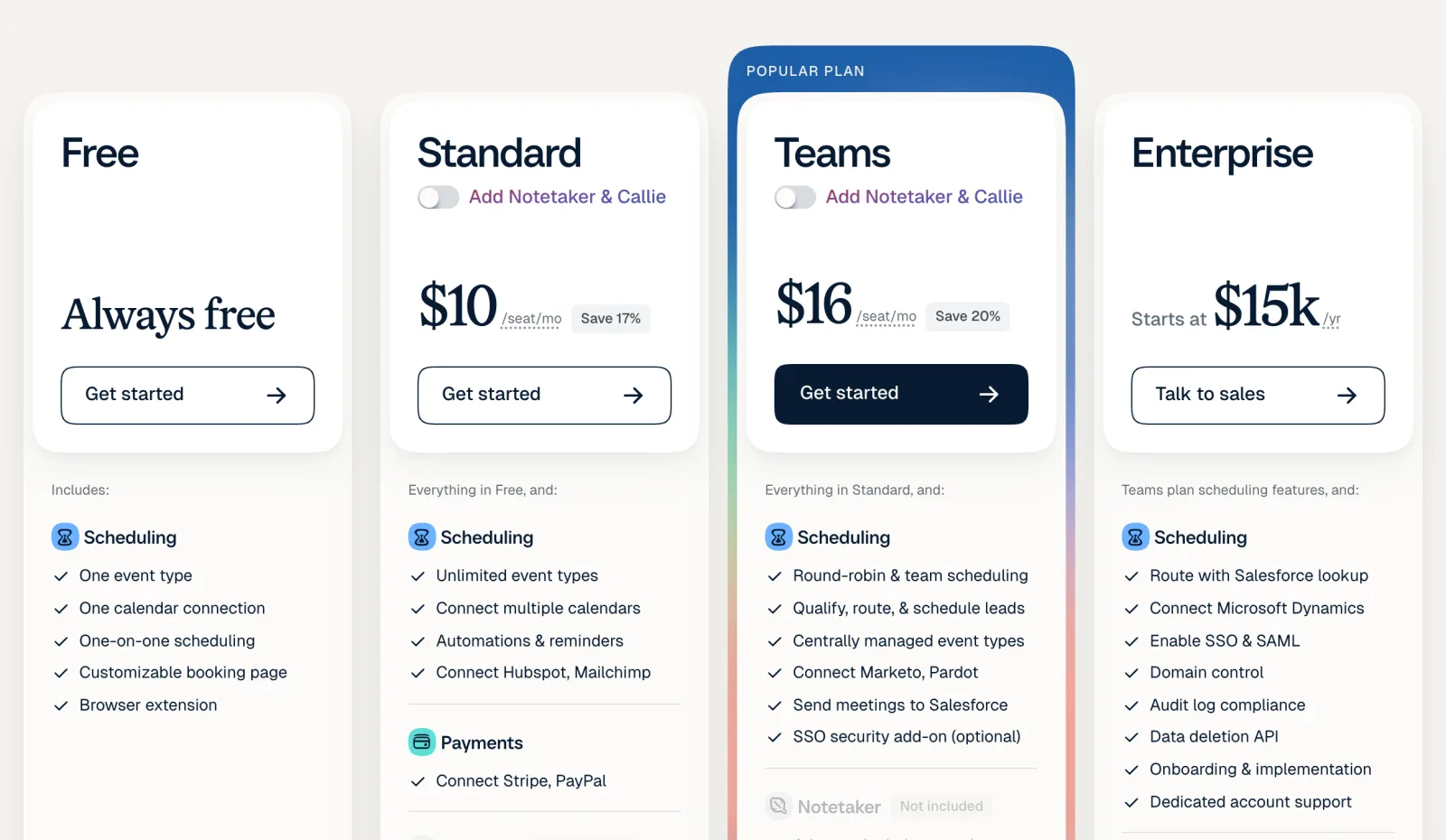
Calendly has a free plan with one event type and one connected calendar. Standard is listed at $10 per seat a month billed yearly and adds unlimited event types, up to 6 connected calendars, Stripe and PayPal payments, and automations and reminders. Teams is listed at $16 per seat a month billed yearly and adds round-robin scheduling and routing forms that qualify and route leads. Enterprise starts at $15,000 a year.
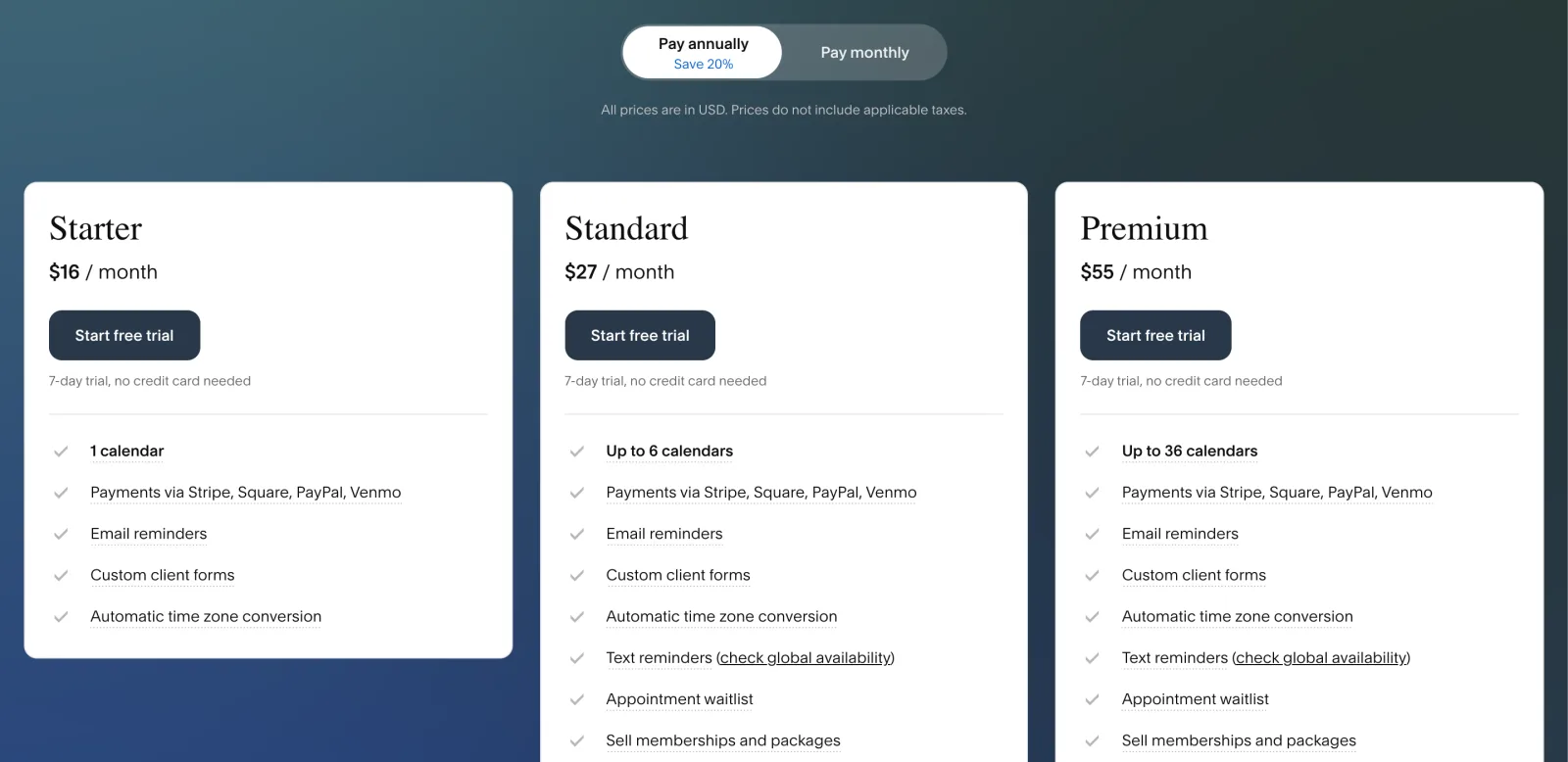
Acuity Scheduling lists three plans. Starter is $16 a month billed yearly or $20 monthly, with one calendar. Standard is $27 or $34 with up to 6 calendars, and Premium is $55 or $69 with up to 36. Every plan takes payments and deposits through Stripe, Square, PayPal or Venmo; Standard and Premium add packages, payment plans, memberships and gift certificates.
Both are built for calls and appointments booked by the time slot.
Scheduling link vs quote-to-booking
| Step | Scheduling link | Booking with the quote built in |
|---|---|---|
| Customer picks | A time slot | The date, services, hours, guests and extras |
| Price | Fixed per event type | Worked out from their answers, with travel |
| Availability | Your open hours | Your open hours, blocked days, notice and daily event limit |
| Contract | A separate tool | Signed when they accept |
| Deposit | Optional payment for the slot | Taken when they accept, with the balance on a schedule |
| After booking | A calendar invite | Invoice, reminders, crew and an event brief |
If most of your bookings are quoted jobs, a scheduling link leaves you rebuilding the right column by hand.
What to look for in a Calendly alternative
Consultation calls that sit next to your quotes
Bigger jobs often start with a call. Look for call types with their own length, weekly hours, buffers, a daily limit and notice, plus reminder emails and a reschedule link, so you're not juggling two tools.
A quote the customer can book from
After the call, the customer should get a priced quote they can accept, sign and pay from, without a second login or a separate invoice.
Availability that blocks real conflicts
Calls shouldn't land on top of events you've booked. Look for a setting that keeps calls away from your events with a margin before and after.
Deposits that hold the date
A date should be held once the deposit is paid. See deposits and payment schedules for event businesses for amounts and timing.
Contracts signed at booking
The customer should sign your terms as part of booking. Our event contract template is a starting point.
Sessions with capacity, when you do sell time slots
If you also run fixed sessions (mini sessions, classes, rentals by the hour), you want session length, gaps between sessions, clients per start time and a waitlist, with the session flowing into the same contract and payment.
Where Winkquote fits
Winkquote does scheduling and quoting in one place, and scheduling (calls included) is free on every plan. Under Settings → Scheduling you set up call types of 15 to 60 minutes, as a phone call, in person at the customer's venue or in person at your place. You set weekly hours with as many blocks a day as you like, date overrides for holidays, buffers before and after each call, the most calls in a day, how much notice you need and how far out people can book. Also block time around booked events keeps calls away from your events. Calls never land on a blocked date. See scheduling.
Customers book from your call link on your booking site, see times in their own time zone, and get a confirmation email with a calendar invite, reminders at the times you choose, and a Reschedule or cancel link that only offers open times. Every quote you send also has Book a call, which opens your call times with the customer's details filled in and ties the call to that quote.
The quote is where Winkquote differs from a scheduling link. Your quote form prices the job as the customer answers (services, extras, guests and the travel fee from the real drive) and only offers dates you're open, with your notice and daily event limit checked. When they accept, they sign your contract and pay the deposit on one page, into your own Stripe account, and the balance follows your payment schedule with reminders. See quote forms and payments.
For time-slot work, Sessions and rentals sets up schedules with a session length, a gap between sessions, clients per start time, notice and a booking horizon. Customers pick an open day and time, answer your questions and continue through the quote, agreement and payment. Waitlists and reminders are built in.
Everything lands on one calendar: booked events, quoted dates, calls and blocked time. You can copy a calendar feed into Google, Apple or Outlook Calendar. See calendar and the booking site.
A worked example
Here's the same wedding inquiry both ways, with example numbers.
A couple wants a photographer for 8 hours, 45 miles away, with an engagement session added.
With a scheduling link: they book a 20-minute call. On the call you talk through coverage. Afterward you price it (say $3,200 for 8 hours, $450 for the engagement session and $75 travel, so $3,725), write a proposal, send a contract from another tool and email a payment link for a 30% deposit ($1,117.50). If any step sits in your inbox for a day, the couple keeps shopping.
With quote-to-booking: they fill in your wedding form and see $3,725 before they send, or they book a call from the quote you sent. After the call they accept the quote, sign and pay $1,117.50 on one page. The date is confirmed once the deposit is paid, and the balance is scheduled.
How to switch from Calendly
- Recreate your call types with the same lengths and names, so returning customers recognize them.
- Copy your weekly hours and buffers, and add date overrides for holidays you already know about.
- Set up your services and prices, so quotes can be priced.
- Book a test call and send yourself a test quote all the way to a test payment.
- Swap the links on your website, email signature and bios. Leave the old link up until your last booked call has happened.
Frequently asked questions
What is the best Calendly alternative for small businesses?
It depends on what you book. For meetings alone, any scheduling app with reminders works. For quoted jobs, choose a tool where the customer can book a call, then accept a priced quote, sign the contract and pay the deposit in the same place.
Is there a free alternative to Calendly?
Yes. Calendly itself has a free plan with one event type. In Winkquote, scheduling and consultation calls are free on every plan.
What is a good Acuity Scheduling alternative?
If your appointments come with quotes, travel or contracts, look for booking that prices the job, takes the deposit and collects a signature as part of the booking. Acuity's own plans start at $16 a month billed yearly.
Can customers pay a deposit when they book an appointment?
Yes, in many tools. In Winkquote, customers pay the deposit when they accept the quote, after signing your agreement, and the balance follows your payment schedule with reminders.
Can I stop calls from being booked on event days?
In Winkquote, turn on Also block time around booked events in your call settings and choose the margin before and after each event. Calls also never land on dates you've blocked.
Can customers reschedule a consultation call themselves?
Yes. Every confirmation and reminder email has a Reschedule or cancel link that offers only open times, and the old time opens up again.
Sources (checked November 22, 2026): Calendly pricing, Acuity Scheduling pricing.


