





If you use Jotform or Typeform to take quote requests, the best alternative depends on what happens after someone hits Send. A general form builder collects answers, and you still work out the price, check your calendar and send a contract by hand. A quote form built for service businesses does those steps for you: it prices the request as the customer answers, only offers dates you're free, and turns into a contract and deposit when they say yes.
This guide covers what general form builders do well, where they stop for a business that quotes, what to look for in a quote form builder, and how to switch without losing the leads already coming in.
Why service businesses look for a Jotform alternative
Jotform and Typeform are very good at forms. People usually start looking for something else for one of these reasons:
- The form ends at "Thanks, we'll be in touch." You get an email with answers, then open a spreadsheet to price it. Every request waits on you.
- Totals take work to build. You can add a calculation field, but travel fees, guest-count tiers, minimum hours and add-ons turn into a pile of formulas you have to keep in sync with your real prices.
- The form doesn't know your calendar. A customer can pick a Saturday you booked last month, and you find out when you read the request.
- Contract and deposit are separate tools. The form, the e-signature, the invoice and the payment link each live somewhere different, and the customer has to go through all of them.
- Plan limits bite in busy season. Form builders price by forms, submissions and payment submissions a month.
None of this is a flaw in a form builder. It's just a different job from quoting.
What Jotform and Typeform include today
From each company's own pricing page, checked November 22, 2026:
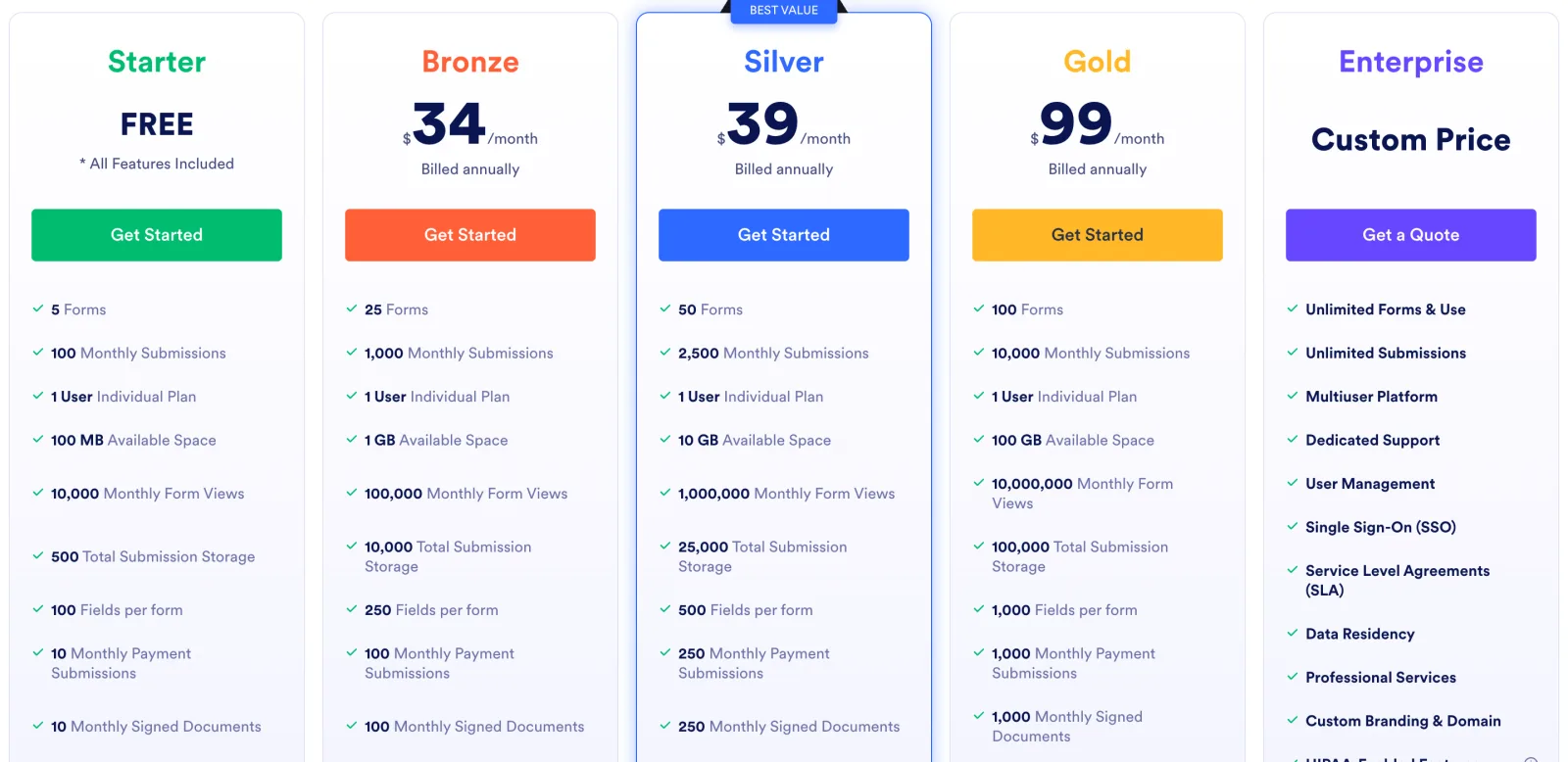
Jotform has a free Starter plan with 5 active forms, 100 submissions a month, 10 payment submissions a month and 10 signed documents a month, with Jotform branding. Paid plans are Bronze ($39 a month, or $34 a month billed yearly), Silver ($49, or $39 billed yearly) and Gold ($129, or $99 billed yearly), with higher limits on forms, submissions and payment submissions at each step. Bronze, for example, allows 25 forms, 1,000 submissions and 100 payment submissions a month.
Typeform prices its plans by responses a month (Basic starts at 100) and seats. Its FAQ says payment questions aren't available on the free plan, and logic and branching are included from the free plan up. Typeform's plan cards and its compare table showed different prices when we checked, so confirm on its pricing page.
Both work for any kind of form: surveys, job applications, registrations. That breadth is the point of a general form builder.
Form builder vs quote form: what's different
| What happens | General form builder | Quote form built for quoting |
|---|---|---|
| Customer picks services | Answers saved as text | Priced from your service list |
| Total | Calculation field you build and maintain | Running estimate from your real prices |
| Travel fee | You work it out after | Worked out from the venue address as they type |
| Date picker | Any date | Only dates you're open, with your notice period |
| After Send | An email with answers | A priced quote ready to send, or an instant quote |
| Contract and deposit | Separate tools | Signed and paid when they accept |
| Unfinished forms | Usually lost | Saved, with a follow-up |
The second column isn't wrong, it's general. The third column is what a quoting business spends hours rebuilding by hand.
What to look for in a quote form builder
Use this checklist when you trial any tool.
1. It prices from your services, not from formulas
You should enter each service once, with how it's priced (flat, per guest, hourly, per item, by guest band), and the form should use those prices. When you change a price, every form changes with it.
2. It shows the travel fee before they send
For anyone who goes to the customer, travel is part of the price. The form should look up the drive from your base to the venue and add it to the estimate, with a rule for addresses past your range. Our guide on how to charge travel fees covers the math.
3. The date picker knows your availability
Closed days, blocked dates, your notice period and how many events you take in a day should be checked on the form itself. A full date should offer a waitlist instead of taking a request you'll have to turn down.
4. It saves answers as they type
People get interrupted. A good quote form keeps what they've entered, tells you who stopped where, and sends a reminder to finish.
5. It works as a booking form with payments
When the customer accepts, they should sign your contract and pay the deposit on the same page, without a second tool. That's the difference between a quote form and a booking form with payments.
6. It embeds anywhere
You'll want it on your own website, on a booking page and behind a link in your Instagram bio.
7. It asks only what you need to price
Long forms lose people. Ask what changes the price and the date before the quote, and the rest after they book. Our list of event inquiry form questions shows what to ask when.
A worked example
Here's the same request on both kinds of form, with example numbers.
A customer wants a mobile bar for 120 guests, 4 hours, on a Saturday, 38 miles away. Your prices: $650 for the bar and 3 hours, $150 for each extra hour, a signature cocktail add-on at $3 per guest, 20 free miles then $1.50 a mile both ways.
On a general form builder, you receive the answers. You price it: $650 + $150 + (120 × $3 = $360) + travel. For travel you look up the drive: 38 − 20 = 18 miles, × 2 × $1.50 = $54. Total = $650 + $150 + $360 + $54 = $1,214. Then you check your calendar, write the quote, send a contract and a payment link. If the reply goes out the next morning, the customer has heard from two other bars.
On a quote form, the customer sees $1,214 on screen before they send, the Saturday is only offered if you're free, and you either review the priced draft or let it go out instantly. They accept, sign and pay the deposit in one sitting.
Same price. One of them took you no time.
Where Winkquote fits
Winkquote's quote forms are built for exactly this. You build a form from a template (event quote, quick inquiry, instant quote, wedding inquiry, office quote, or one made for your kind of business) and add questions like a service picker, add-ons with a running total, a date picker, an address search and photo uploads. Choices can add an amount to the price, and logic shows or skips questions and whole pages. See quote forms.
With your prices showing, the customer sees a running estimate as they answer, with the services, extras and the travel fee worked out from the drive. The date picker strikes out closed days, blocked days and dates inside your notice, and a date that's already full offers a waitlist spot. Answers are saved as they type, so a customer who stops shows up as Didn't finish the form, and a follow-up email with a link to finish goes out on its own.
You choose You review first, where a priced draft lands for you to check and send, or Instant price, where the customer goes straight to their quote and can book on the spot. Either way, they accept, sign your contract and pay the deposit on one page, into your own Stripe account. You can also require a signature on the form itself.
Put it on your website as a Book now button, a card, a half page or a full page, with one line of code that works on Squarespace, Wix, WordPress, Shopify, Showit, Webflow and plain HTML. See add to your website. There's no limit on forms or questions, and running the business is free on every plan. The online payment fee is 2.9%, passed to the customer by default. More on the quote form features page.
Coming from Tally? Settings → Import brings your Tally forms in as drafts, with their pages, questions, choices and show-if conditions, and can add the people who answered as customers.
How to switch form tools without losing leads
- List what your current form asks. Mark each question as "needed to price or date" or "needed later."
- Set up your services and prices first. The form can only price what it knows.
- Build the new form with only the price-and-date questions. Move the rest to questions asked after booking.
- Test it as a customer. Send a test request all the way to a test payment.
- Swap the embed on your website and update the link in your bios. Keep the old form open for a week for anyone mid-request, then turn it off.
- Watch the finish rate for the first month. If people stop on one page, shorten it.
If you'd like a pricing widget on your own site, our guide to a quote calculator for your website goes deeper.
Frequently asked questions
What is the best alternative to Jotform?
For surveys and general forms, other general form builders do the same job. For quote requests, the better alternative is a quote form that prices the request from your services, checks your availability and turns into a contract and deposit when the customer accepts.
Is there a free alternative to Jotform?
Yes. Several form builders have free plans, and Jotform's own Starter plan is free with limits. Winkquote's quote forms are free on every plan, with no limit on forms or questions; an online payment fee applies only when customers pay online.
What is a good Typeform alternative for quotes?
Look for a form that adds up the price as people answer, shows the travel fee, only offers open dates, and lets the customer sign and pay the deposit when they accept. Typeform's FAQ says payment questions aren't available on its free plan.
Can a form calculate a quote automatically?
Yes. General form builders use calculation fields you build yourself. A quote form built for service businesses uses your service prices, add-ons and travel rules, so the total updates as the customer answers and stays in sync when you change a price.
How do I make a booking form with payments?
Use a tool where the quote, the contract and the payment are one step for the customer. In Winkquote, the customer accepts the quote, signs your agreement and pays the deposit on one page, and the payment goes to your own Stripe account.
Can I embed a quote form on my website?
Yes. Most quote form tools give you a code snippet. Winkquote's is one line and works as a pop-up button, a card, a half page or a full page on Squarespace, Wix, WordPress, Shopify, Showit, Webflow or plain HTML.
Sources (checked November 22, 2026): Jotform pricing, Typeform pricing.


